

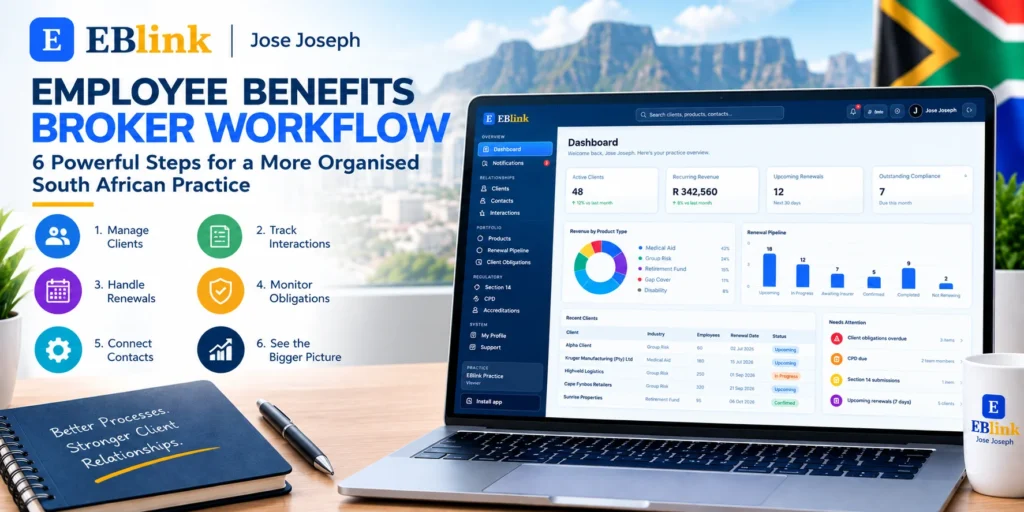
Employee Benefits Broker Workflow: 6 Powerful Steps. Running an employee benefits brokerage involves more than advising employers and recommending products.
Every day can involve client communication, follow-ups, product information, renewal dates, compliance-related tasks and administrative work.
When these activities are handled across spreadsheets, emails, calendars and separate documents, it can become difficult to maintain a consistent process.
A structured employee benefits broker workflow can help bring these activities together and give brokers a clearer view of what needs to happen, when it needs to happen and which client it relates to.
For South African employee benefits brokers, building an organised workflow can make everyday practice management easier and more consistent.
What Is an Employee Benefits Broker Workflow?
An employee benefits broker workflow is the series of processes a brokerage follows to manage client relationships and ongoing work.
It can cover the journey from acquiring and onboarding a client through to managing products, communicating with contacts, handling renewals and completing ongoing obligations.
A practical workflow may include:
- Managing employer clients
- Recording key contacts
- Tracking client interactions
- Managing benefit products
- Monitoring renewal dates
- Following up on outstanding tasks
- Managing client obligations
- Reviewing practice activity
The objective is simple: make sure important work has a clear place in the brokerage’s process.
1. Start With a Central Client Record
A strong employee benefits broker workflow starts with accurate client information.
Instead of keeping employer details in one spreadsheet and contact information in another document, brokers can maintain a central client record.
Useful information can include:
- Employer name
- Industry
- Number of employees
- Scheme information
- Renewal date
- Client status
- Key contacts
- Products
- Relevant notes
Having this information available in one place makes it easier to prepare for meetings and follow-ups.
EBlink provides a dedicated Clients area for managing employer group relationships.
This gives brokers a central starting point for the rest of the workflow.
2. Connect Contacts to Each Client
An employer relationship rarely involves only one person.
A broker may communicate with an HR manager, trustee, finance representative or another decision-maker.
Keeping those contacts connected to the correct employer record can make communication more organised.
A CRM workflow should therefore connect contacts directly to their relevant client.
This makes it easier to understand who is involved in a relationship and reduces the need to search through separate contact lists.
It also gives brokers a clearer picture before sending an email, arranging a meeting or following up on an outstanding matter.
3. Record Important Client Interactions
The next step is keeping track of interactions.
Emails, meetings, calls and follow-ups can create a long history over the life of a client relationship.
If that information remains only inside individual inboxes, it can be difficult for another team member to understand what has already happened.
A structured interaction history provides useful context.
Before contacting a client, the broker can review previous activity and understand the latest stage of the relationship.
This is especially useful when several people within a brokerage work with the same employer.
4. Build Renewals Into the Workflow
Renewals should not exist as a separate process disconnected from client management.
A renewal is connected to the client, the relevant product, the insurer, important dates and the conversations that happen before the renewal is completed.
That is why renewal tracking should form part of the wider employee benefits broker workflow.
A dedicated renewal pipeline can help brokers see:
- Upcoming renewals
- Renewal dates
- Products
- Insurers
- Current renewal stages
- Premium information
- Completed renewals
- Renewals still requiring action
EBlink includes a Renewal Pipeline that brings these details into one view.
This can help brokers identify upcoming work without relying entirely on individual spreadsheets or calendar reminders.
5. Give Outstanding Work a Clear Home
Not every task is a renewal.
Employee benefits practices also have ongoing administrative and client-related obligations.
These can include reviews, submissions, disclosures and other activities that need to be monitored.
When these tasks are stored in different places, it can become difficult to understand the complete workload.
A central obligations workflow gives the team a dedicated place to monitor outstanding work.
EBlink’s Client Obligations area provides visibility into overdue, pending and completed obligations.
This creates a more structured process for identifying work that still needs attention.
6. Review the Practice From One Dashboard
The final step is gaining a broader view of the brokerage.
Even when individual client records are well organised, brokers still need to understand what is happening across the entire practice.
A dashboard can bring key information together, including:
- Active clients
- Revenue information
- Upcoming renewals
- Outstanding compliance-related items
- Product activity
- Renewal stages
- Recent client activity
This can help turn individual records into a wider practice overview.
Instead of starting the day by checking several different systems, brokers can begin with a central view of the practice.
Why a Consistent Workflow Matters
An employee benefits brokerage can have many moving parts.
One client may require a renewal discussion.
Another may have an outstanding obligation.
A third may need a follow-up after a recent meeting.
At the same time, new business may be entering the pipeline.
Without a consistent workflow, these activities can easily become disconnected.
A structured process helps create clear connections between clients, contacts, interactions, products, renewals and obligations.
The result is not simply more information.
It is a more organised way of working with that information.
Moving Beyond Spreadsheet-Based Workflows
Spreadsheets can be useful for simple lists and calculations.
However, managing an entire employee benefits practice through spreadsheets can become increasingly difficult as the client base grows.
Information may be duplicated.
Dates may need to be updated manually.
Different team members may maintain different versions.
Important context may remain inside individual emails.
A CRM provides another approach.
Instead of using a spreadsheet as the central source for every part of the practice, brokers can use a system designed around relationships, workflows and ongoing practice activity.
How EBlink Supports the Broker Workflow
EBlink brings several areas of an employee benefits practice together.
Clients
Manage employer group information and maintain a central client record.
Contacts
Connect important people to the appropriate employer relationship.
Interactions
Keep track of client-related activity and communication history.
Products
Maintain visibility across products within the practice.
Renewal Pipeline
Track upcoming renewals and monitor their progress through different stages.
Client Obligations
Keep outstanding, pending and completed obligations visible.
Section 14 and CPD
Access dedicated areas within the practice environment for relevant workflows.
Together, these areas can support a more connected employee benefits broker workflow.
A Practical Workflow for a South African Broker
A simple daily workflow could look like this:
Start with the Dashboard.
Review the overall practice and identify items requiring attention.
Check Clients.
Review important client information before meetings and follow-ups.
Review Interactions.
Understand recent communication and activity.
Check Renewals.
Identify upcoming renewal dates and review their current stages.
Review Client Obligations.
Look for outstanding or overdue items.
Update the Practice.
Keep client records, contacts and workflow information current.
This creates a repeatable process rather than relying on memory or scattered reminders.
Final Thoughts
A good employee benefits broker workflow does not have to be complicated.
The most important step is creating a consistent process for managing the information and activities that make up the brokerage.
When client records, contacts, interactions, products, renewals and obligations are connected, brokers can spend less time searching for information and more time managing their client relationships.
For South African employee benefits brokers, a structured CRM workflow can provide a practical foundation for running a more organised practice.
EBlink brings these core brokerage workflows together in one environment, helping brokers manage their practice from client relationships through to renewals and ongoing obligations.
The goal is simple: one connected workflow for the everyday work of an employee benefits brokerage.